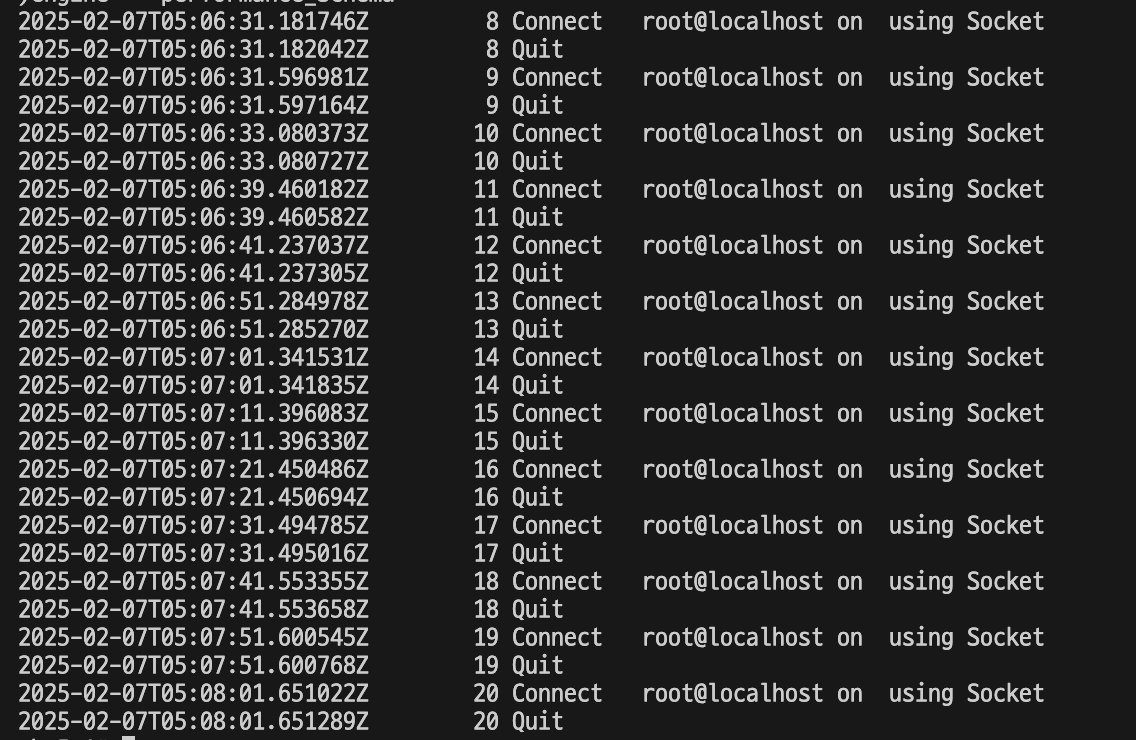
While checking MySQL's general log, I noticed that the message Connect Access denied for user 'root'@'localhost' (using password: NO) was added every 10 seconds.

I clearly set the password through the environment variable MYSQL_ROOT_PASSWORD provided by the MYSQL Docker image, and when I checked the SQL statement in another General log, it didn't seem to be a problem caused by an incorrect root account.
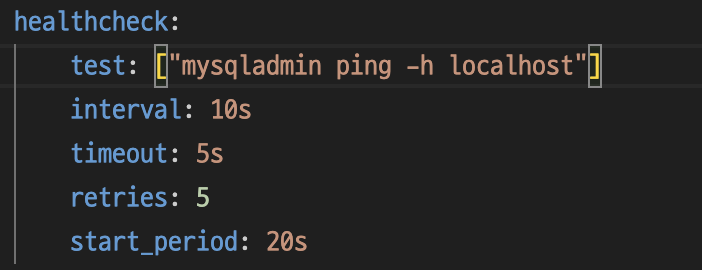
I wondered what the problem was, and after looking into whether MySQL had a regular task performed every 10 seconds, I realized that it was executing a health check using mysqladmin every 10 seconds to check whether the MySQL container was operating smoothly.
And I tried going directly into MySQL's container and executing the mysqladmin command and I could see the same message.

Here's a question I had. Up until now, the MySQL server has never been shut down due to an error while it was running. It never tried again. However, looking at the health check results, it should have restarted after 70 seconds, since it waited for 20 seconds + 5 times at 10-second intervals (50 seconds). However, it didn't.
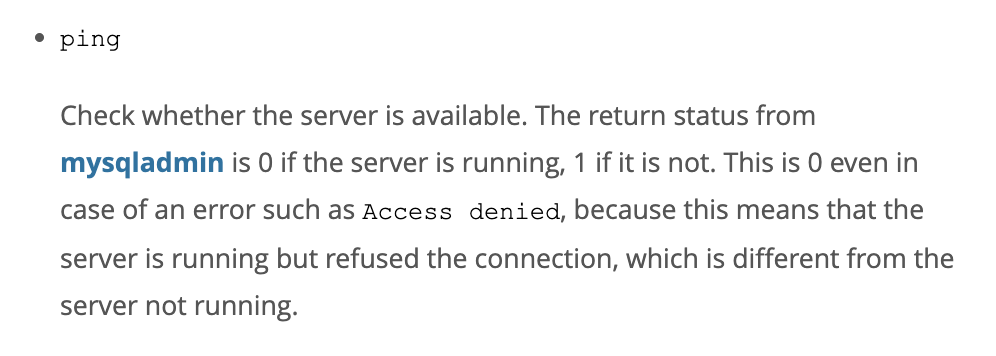
So I was curious why the mysqladmin ping command determined that the container was running normally in this case, and I was able to find the answer on the MySQL site.
https://dev.mysql.com/doc/refman/8.4/en/mysqladmin.html
MySQL :: MySQL 8.4 Reference Manual :: 6.5.2 mysqladmin — A MySQL Server Administration Program
6.5.2 mysqladmin — A MySQL Server Administration Program mysqladmin is a client for performing administrative operations. You can use it to check the server's configuration and current status, to create and drop databases, and more. Invoke mysqladmin li
dev.mysql.com
If you interpret it, when you enter the mysqladmin ping command, if the server is running, it returns 0, and it includes cases where it returns 0, including when Access is denied. It says that the reason is that the MySQL connection is rejected, but the server is running normally.
So how do you solve this problem? You can enter the account to execute the mysqladmin command with the -u and -p options in mysqladmin, but I wanted to solve it more clearly. (Without entering the -u and -p options) So I was curious about how mysqladmin retrieves the MySQL settings, so I looked it up with the mysqladmin —help command.

After checking, I found out that mysqladmin was running based on the settings in my.cnf, and only then did I realize why I couldn't log in as the root account. The root account password was registered through the MYSQL_ROOT_PASSWORD environment variable, so I didn't know the root account password because it wasn't written in the cnf file.
So I thought about writing the root account password in the cnf file, but since the cnf file is written as a plain value, I decided not to do so and instead gave the -p option to the command.
After that, I was able to confirm that I was accessing the root account normally.
However, when I entered the command directly, I saw the warning message.

It is said that directly entering a password in a CLI can be a security threat.
So, to solve this problem, I decided to consider something called mysql_config_editor. mysql_config_editor creates a cnf file and injects account information into it, but it has the advantage that users cannot read the file because it is obfuscated.
However, the MySQL Docker image does not have the mysql_config_editor utility program installed to make it lightweight. If you actually enter the mysql_config_editor command, you can see that command not found appears.

So I thought about just reducing the authority for health check and creating an account that doesn't require a password.
When I asked the AI, it said that you can grant authority to only check the server status and not actually execute queries through PROCESS.
I looked into the official documentation to find out the relevant information.

https://dev.mysql.com/doc/refman/8.4/en/grant.html
MySQL :: MySQL 8.4 Reference Manual :: 15.7.1.6 GRANT Statement
15.7.1.6 GRANT Statement GRANT priv_type [(column_list)] [, priv_type [(column_list)]] ... ON [object_type] priv_level TO user_or_role [, user_or_role] ... [WITH GRANT OPTION] [AS user [WITH ROLE DEFAULT | NONE | ALL | ALL EXCEPT role [, role ] ... | role
dev.mysql.com
After checking, I found out that the PROCESS permission grants the user the right to query SHOW PROCESSLIST. It seems that this is the minimum permission because other than that, no other queries can be executed. However, I wondered if I really needed to grant the PROCESS permission, so I analyzed the MYSQL Server repository on GitHub.
https://github.com/mysql/mysql-server/tree/6b6d3ed3d5c6591b446276184642d7d0504ecc86
GitHub - mysql/mysql-server: MySQL Server, the world's most popular open source database, and MySQL Cluster, a real-time, open s
MySQL Server, the world's most popular open source database, and MySQL Cluster, a real-time, open source transactional database. - mysql/mysql-server
github.com
In fact, when you execute the ping command in mysqladmin, it uses a function called mysql_ping, which calls a function called simple_command, which calls a protocol called COM_PING. Since the COM_PING protocol can be used by anyone with an authenticated account, it can be executed even if you only have PROCESS privileges.
https://dev.mysql.com/doc/dev/mysql-server/8.4.3/page_protocol_com_ping.html
The execution process of the mysqladmin ping command analyzed through the MySQL server is as follows.
- mysqladmin creates a mysql object by executing mysql init. At this time, it obtains the authority to execute mysql connection and some mysql commands through the mysql_real_connect function.
- After creating a connection, the mysql_ping function is executed internally to execute the ping command, and the mysql_simple_command function is executed internally.

3. The mysql_simple_command function executes the advanced_method function in the methods property of the mysql object.
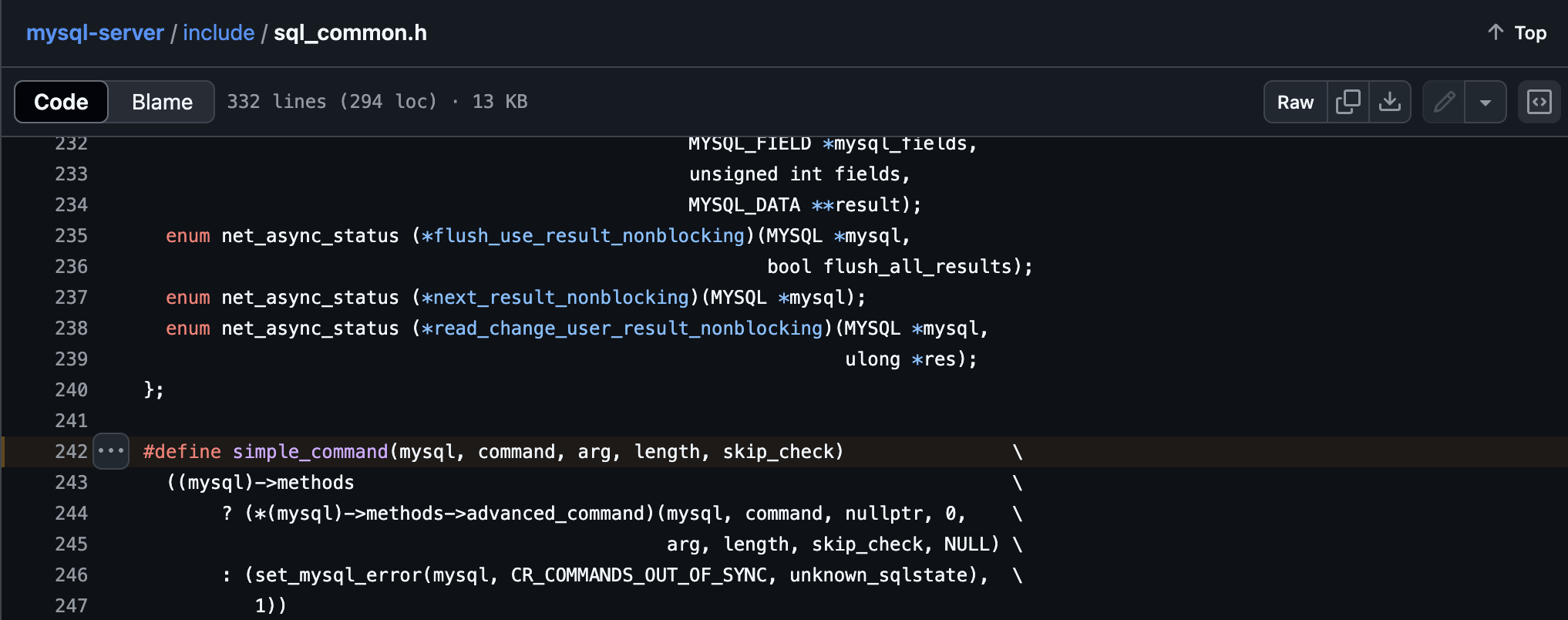
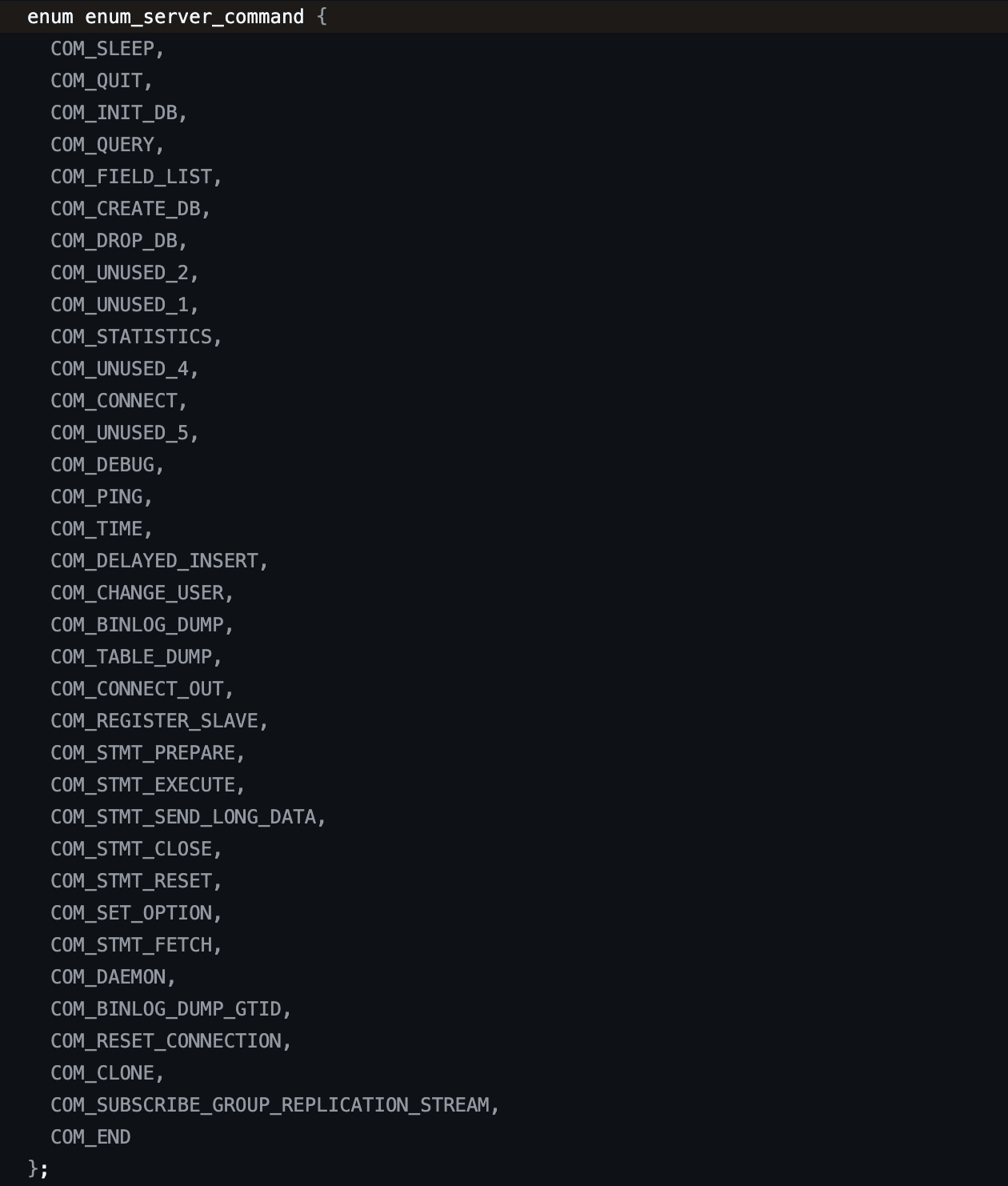
4. The enum_server_command type is included in the function argument value of cli_advance_method, and in the 1417th line, if (net_write_command(net, (uchar)command, header, header_length, arg, arg_length)) { set_mysql_error(mysql, CR_SERVER_GONE_ERROR, unknown_sqlstate); goto end;}, the COM_PING command is sent to the server, and the server processes the request to execute the COM_PING command and returns.
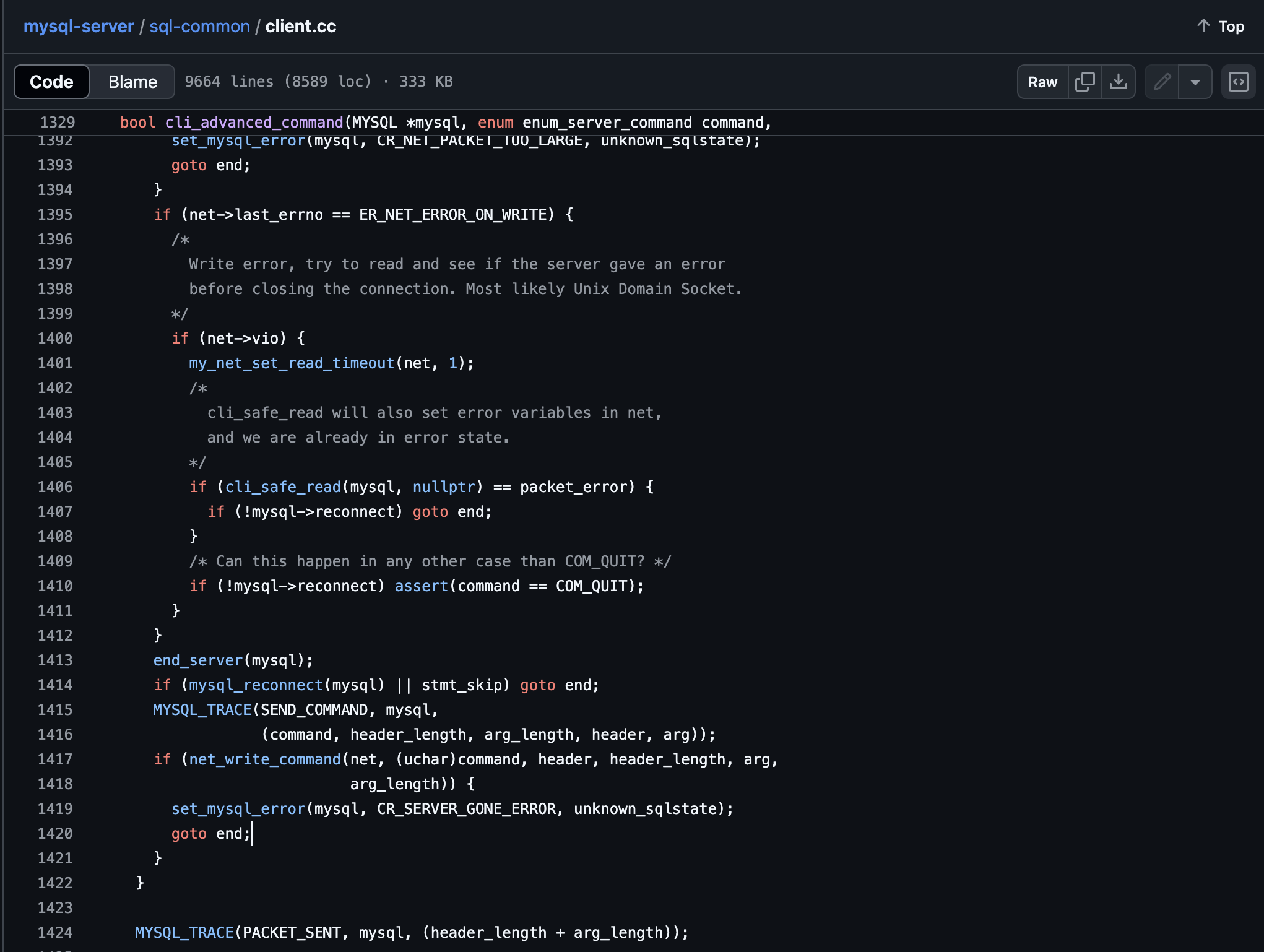
By the way, the reason advanced_command was changed to cli_advance_command is because the methods property of mysql uses cli_advanced_command as advanced_command.

Additionally, when advanced_command is called like this, the data to be sent to the MySQL server is put into a buffer and the buffer is used to send a packet. The MySQL server that received the packet from the Connection Thread executes do_commands -> dispatch_command and checks whether the server is alive in the case of COM_PING. (It seems that a lot is omitted, but from what I checked, it seems that it only does login.)
This is how I realized that the mysqladmin ping command is implemented using COM_PING, which is available to any authenticated user, rather than being verified via SHOW PROCESSLIST.
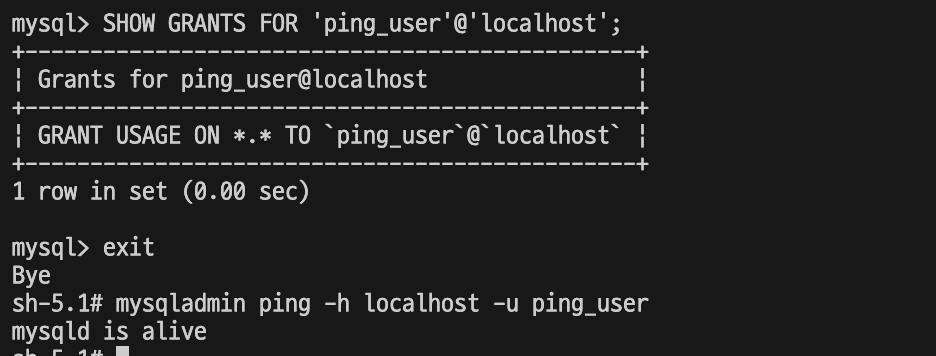
So I was wondering if it would be okay to not grant PROCESS privilege and just not allow any queries to be used?

I tested it by changing it to the USAGE option which does not grant any permissions and confirmed that the health check is performed normally!